
Software Training Isn’t Just a Demo: Lessons from a Painful Webinar

Recently, I attended a software training webinar with around 170 people on the call.
As someone who designs and delivers software training professionally, I had that strange feeling you get when you can see a train slowly heading toward a problem, but you’re just one passenger in the carriage.
The presenter was clearly a technical expert. He knew the system. But within the first few minutes, it became clear that knowing a system and teaching people how to use it are two very different skills.
The first challenge appeared almost immediately. The presenter was using his laptop’s built-in microphone rather than a headset, which meant the audio was muffled and hard to hear. For the first fifteen minutes, people in the chat were trying to figure out whether the problem was their own speakers before someone finally spoke up.
Even before the audio was sorted, we had started the live demonstration. The presenter had his interface set to dark mode, which is perfectly fine for everyday work, and easier on the eyes, but when screen sharing to a large audience it created a different problem. Many participants were trying to follow along on their own screens, which looked completely different, and the contrast made small buttons and menus harder to see.
Then came the moment where the session started to unravel.
To demonstrate a key part of the “getting started” process, the presenter used his own account. The issue, of course, was that his account had already been activated. When the rest of us tried to follow the same steps, we all received an error message.
The presenter assumed it was an occasional glitch and invited anyone experiencing it to email him afterwards.
But the chat told a very different story.
Nearly everyone was reporting the same issue. Unfortunately, he couldn’t see that because he was focused on presenting and didn’t have anyone monitoring the chat. With 170 people in the session, it’s almost impossible to present and manage that channel at the same time.
Some participants like myself realised the error didn’t actually prevent them from moving forward and carried on. Others became stuck and quickly fell behind.
Soon the comments began appearing:
“I’m lost. My learning style is slower than that.”
Interestingly, the pace itself wasn’t especially fast. What was happening was that people had missed a step and didn’t have a way to recover. Once that happens in software training, it’s very easy for learners to feel lost.
A simple job aid - something like a Quick Reference Guide (QRG) with the steps clearly listed - would have made a huge difference. Participants could have quickly checked where they were meant to be and rejoined the flow of the session.
Without that support, the session became increasingly fragmented.
When people went off mute to ask questions, the conversation often went in completely different directions. Some questions were interesting but unrelated to the learning objectives. Others were surprisingly foundational; questions like
“Why are we doing this again?”
That moment was particularly revealing. Questions like that shouldn’t appear during a training session. They belong in change communications, well before anyone sits down to learn the system.
Meanwhile, the live demonstration continued. As is often the case with software interfaces, some buttons were small or tucked into corners of the screen. Without techniques to guide the learner’s attention, it was difficult for participants to see exactly what they were supposed to click.
By the end of the session, the chat was filled with comments like:
“I’ll just re-watch the recording later at slower speed.”
Which is always a slightly painful sentence to read.
If 170 people spend an hour in a training session but still need to watch the recording to understand it, that’s a significant amount of lost time. And watching the same
hour again rarely solves the underlying design problems.
None of this reflected poorly on the presenter’s expertise. He clearly knew the system well.
The issue was something else entirely: the training hadn’t been designed as training.
Designing software training so it actually works
Many people – technical folks included - often assume that the person who knows the system best should also teach it. In practice, effective software training usually involves a small team working together.
A technical expert plays a critical role in explaining how the system works and what users need to achieve. Learning designers then translate that knowledge into clear, repeatable steps and structured learning experiences.
In a live session, that might mean:
Having two facilitators: one presenting and one monitoring the chat
Ensuring the software expert is available to troubleshoot unexpected issues
Designing the session around specific learning outcomes, so questions can be triaged appropriately
Focusing the training on the user’s needs rather than the system’s functions.
Providing job aids such as Quick Reference Guides (QRGs) so learners can quickly recover if they miss a step
Live sessions also work best when they’re part of a broader learning approach rather than the only resource available.
For example, learners might also have access to:
Story-based eLearning modules with carefully recorded demonstrations
Zoomed-in screen recordings and highlighted steps that make navigation easier to see
Quick Reference Guides for day-to-day tasks
Optional drop-in sessions for additional support
This kind of multi-modal approach means learners don’t have to rely on memory - or on rewatching a long recording - when they need to perform a task later.
Examples
We designed this training around the learners’ use-cases, NOT around the software’s functionality.
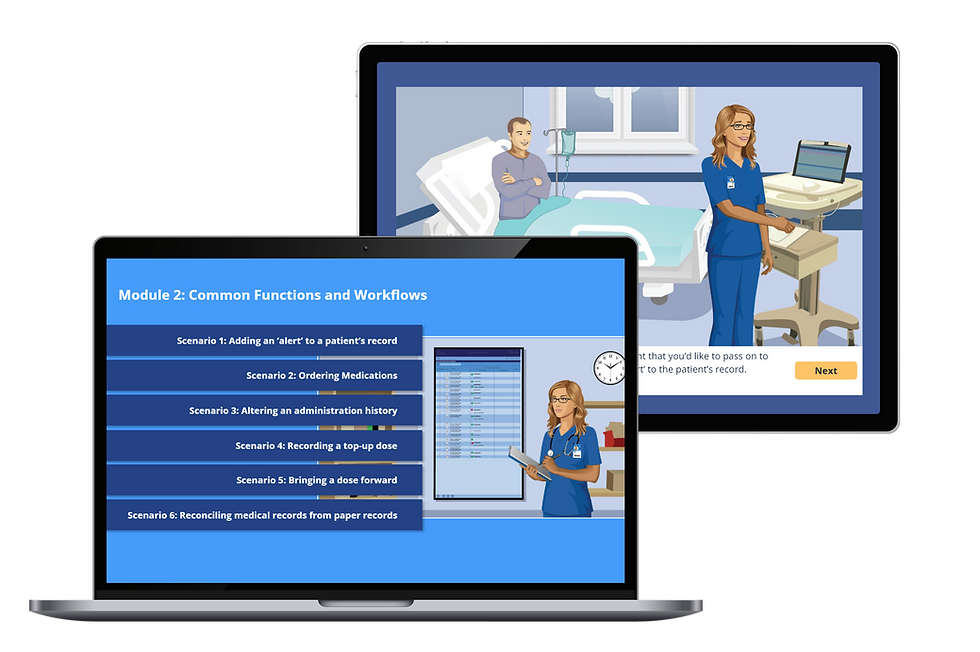
In this training, we made sure learners’ attention was drawn to the appropriate parts of the very small screen, one portion at a time.

Examples of Quick Reference Guides (QRGs)
If your organisation is rolling out new software, it’s worth remembering that knowing the system and teaching it effectively are two very different things. With the right learning design, software training becomes clearer, faster, and far less frustrating for everyone involved. A well-structured session, supported by practical job aids like Quick Reference Guides and additional learning options, helps people move from watching a demo to actually being able to perform the task. And that’s when training really starts to deliver value.
Need some help?
Contact us for a chat, we’d love to work with you to make sure your people have a seamless transition to the next system you roll out.


